

CDN Dağıtımları
CDN Distributions allow you to instantly update sources and translations in your mobile, server, desktop, or web apps with a single click without preparing a new release.
Aşağıdaki çizimler, kaynak ve çeviri içerik tesliminin farklı uygulama türleri için nasıl çalıştığını görsel olarak göstermektedir.
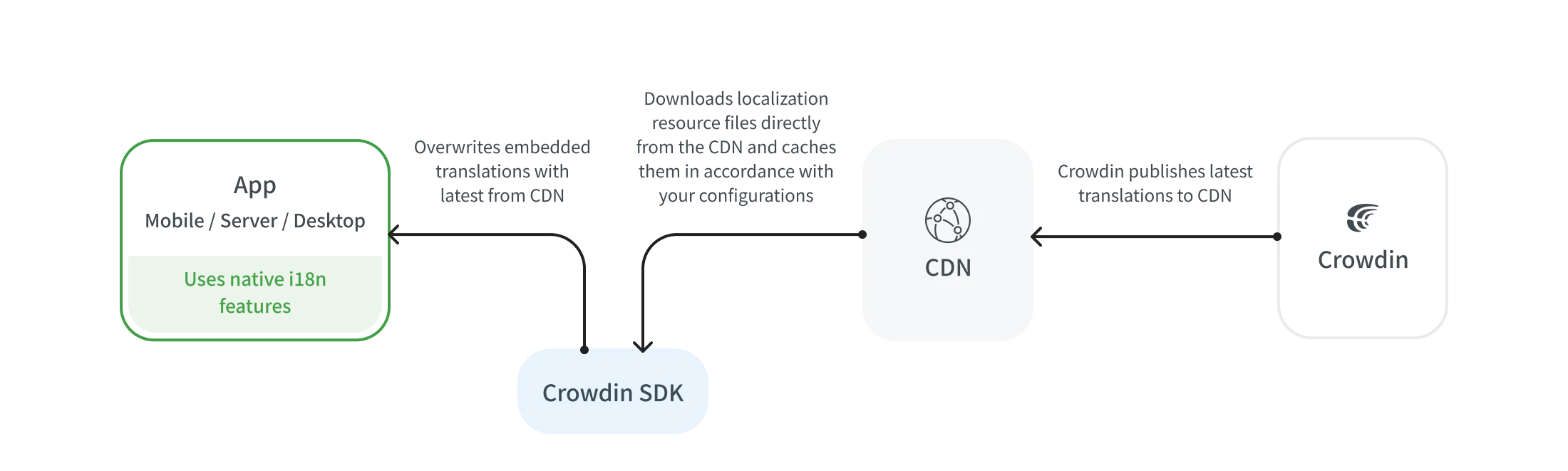
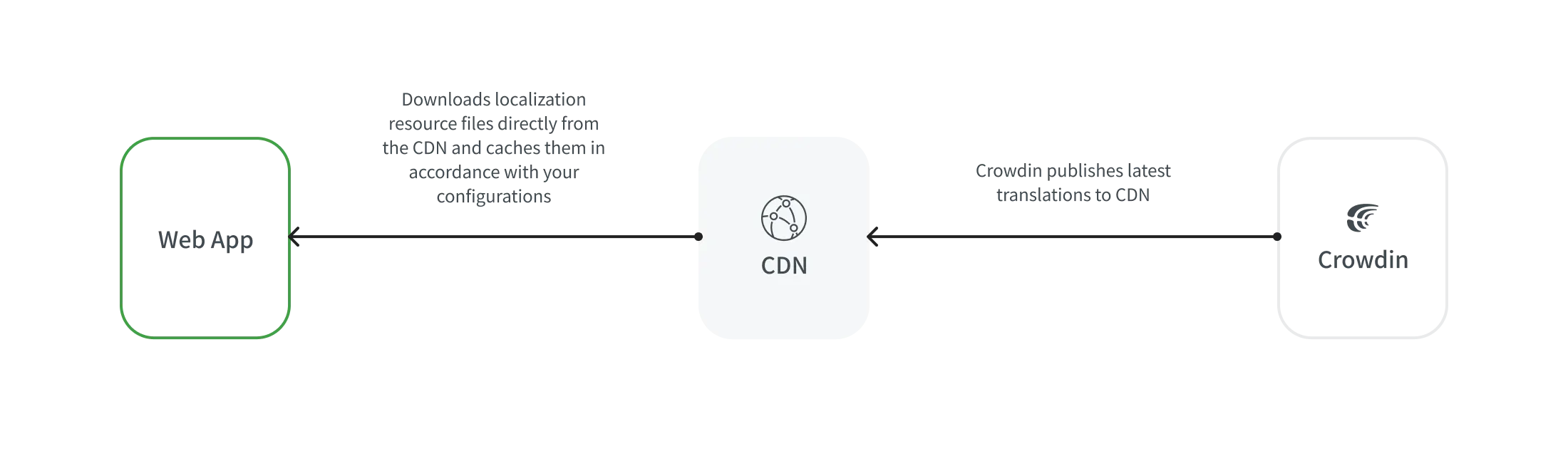
A distribution is a CDN vault that mirrors your project’s translated content and is required for integration with your apps. Dağıtımlar, dosyalarınızı paketlemek ve sunmak için Paketler kullanılarak çalışır.
Bir dağıtımı yapılandırmak için şu adımları izleyin:
- Open your project and go to the Translations tab.
- Expand the CDN Distributions section.
- Click Add.
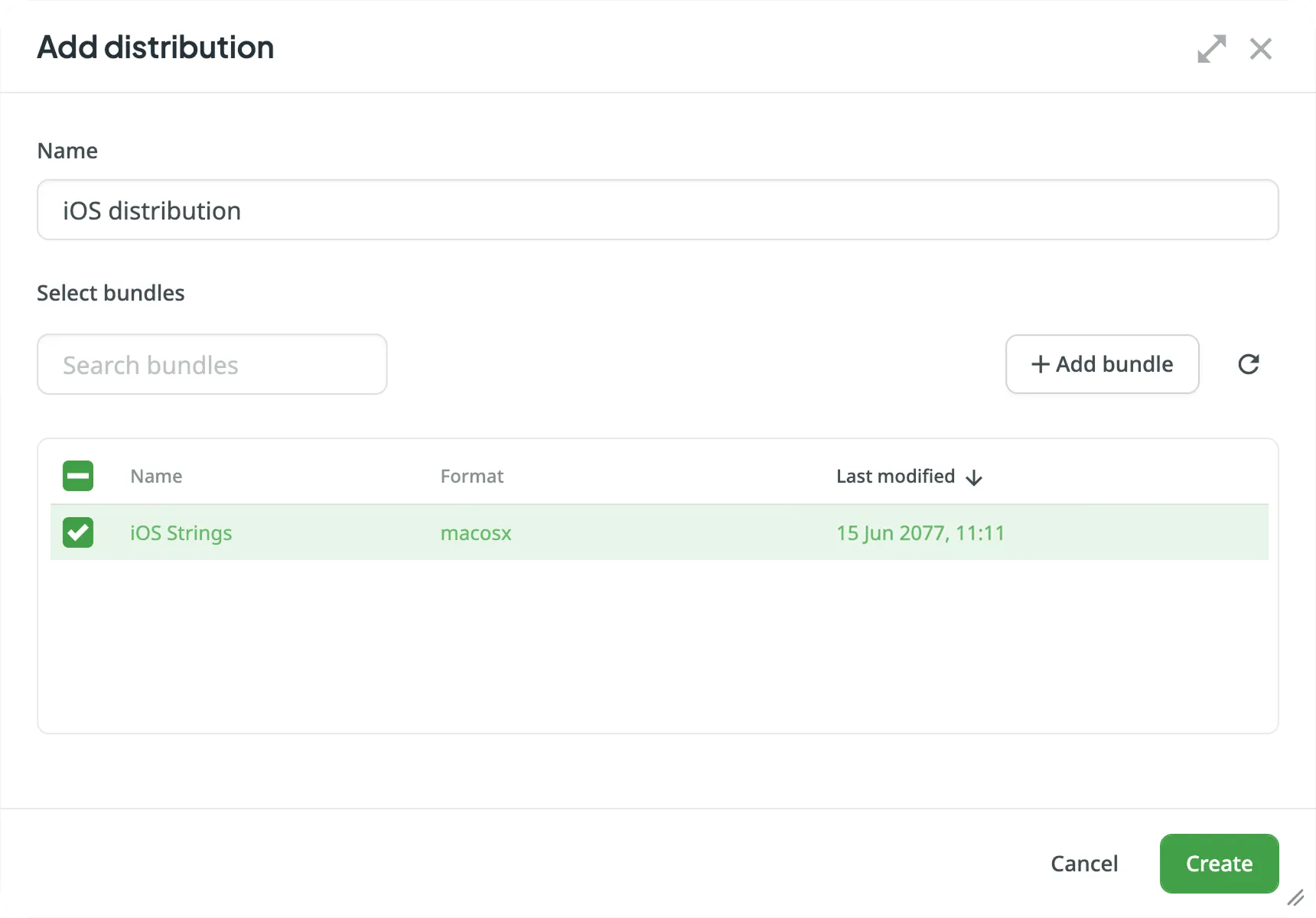
- In the Add distribution dialog, enter the preferred name for your distribution.
- Select the bundles you want to include in this distribution or click Add bundle to create one from scratch. You can use the Search bundles field to quickly find specific bundles by name.
- Oluştur’a tıklayın.
- Dağıtım Adreslemesi ve Dağıtım Bildirisi’ni kopyalayın. The manifest is a JSON file containing key distribution details (e.g., files, languages, paths) that can be used in your integration.
- Projenizi açın ve İndirme sekmesine gidin.
- Expand the CDN Distributions section.
- Click Add.
- In the Add distribution dialog, enter the preferred name for your distribution.
- Select the bundles you want to include in this distribution or click Add bundle to create one from scratch. You can use the Search bundles field to quickly find specific bundles by name.
- Oluştur’a tıklayın.
- Dağıtım Adreslemesi ve Dağıtım Bildirisi’ni kopyalayın. The manifest is a JSON file containing key distribution details (e.g., files, languages, paths) that can be used in your integration.
To send the translated content to your mobile apps via CDN Distributions, use the Crowdin SDKs.
To send the translated content to your web apps via CDN Distributions, use the Crowdin OTA JavaScript client.
Read more about the Crowdin OTA JavaScript client.
To manage the translated content delivery to your web apps manually, you can either:
- Use the Distribution Manifest URL, which displays a JSON file containing distribution details (files, languages, etc.), or
- Form each file URL with the distribution hash, as shown below.
Çeviri dosyası için URL’yi aşağıdaki gibi oluşturun:
https://distributions.crowdin.net/{dağıtım_adreslemesi}/content/{dosya_yolu}{path_to_file} will match the path used in your regular translation build. Eğer dosyalarınızda dil kodu yer tutucuları (örn. %locale%, %two_letters_code%, vb.) dahil dışa aktarma şekilleri yoksa, Crowdin otomatik olarak Crowdin dil kodunu yolun başına ekler.
Dağıtımınız için mevcut tüm dosyaları ve dilleri görmek için Dağıtım Bildirisi URL’sini (Crowdin kullanıcı arayüzünde sağlanır) kopyalayın ve tarayıcınızda açın.
You’ll see a JSON structure like:
{ "files": ["/crowdin_sample_android.xml"], "languages": ["fr","de","uk"], "language_mapping": [], "custom_languages": [], "timestamp": 1234567890, "content": { "fr": ["/content/fr/crowdin_sample_android.xml"], "de": ["/content/de/crowdin_sample_android.xml"], "uk": ["/content/uk/crowdin_sample_android.xml"] }, "mapping": ["/mapping/en/crowdin_sample_android.xml"]}This JSON includes the exact paths to use with the distribution.
| Pricing Component | Free Quota | Price |
|---|---|---|
| İstek Sayısı | 1M/ay | $3/1M |
| Veri Aktarımı | 10GB/ay | $2/10GB |
Bir istek, bir CDN’ye yapılan herhangi bir tek sorgu olarak kabul edilir (örn., bir dağıtım bildirimine yapılan istek, bir dağıtım dosyasına yapılan bir istek vb.).
Veri aktarımı, ağ üzerinden aktarılan veri miktarıdır (başlıklar dahil). Sistem, varolan tüm çevirileri içeren dil paketlerinizi CDN aracılığıyla teslim eder.
Eğer dağıtım birden çok dosyaya bölünmüş içerik içeriyorsa, her bir dosyayı indirme isteği ayrı bir istek olarak sayılır. Ayrıca dosyaların hacmi de veri aktarımı olarak sayılır.
Örneğin, bir dağıtım her biri 5MB boyutunda 20 dosya içeriyorsa, indirme işlemi 20 istek ve 100MB veri aktarımı olarak sayılır.
CDN’ye gelen istekleri azaltmak için gerekli tüm içeriği tek bir dosyaya (Paketleri kullanarak) koyabilirsiniz ve indirildiğinde sistem 20 ayrı istek yerine bir isteği sayar. Ayrıca uygulama tarafında önbellekleme yapılandırması da yapılabilir.
İstatistiklerimizde AWS tarafından sağlanan verileri kullanırız. Eğer ayda 1.000.001 (1 milyon 1) adet istek yapılması durumunda, istek ücreti 6$ olacaktır. Eğer ayda 10GB ve 1 bayt aktarılması durumunda veri aktarım ücreti $4 olacaktır. İsteklerin ve veri aktarımının birleşik toplamı aylık $10 olacaktır.
Hesap Ayarları > Faturalandırma > CDN Dağıtımları bölümünden CDN kullanım ücretini yönetebilir ve günlük kullanım sınırları için bildirimleri ayarlayabilirsiniz.
In the CDN Distributions usage section, you can see the total amount spent during the current billing cycle (one month). This includes a detailed breakdown of requests and data transfer with their respective prices. Payment for CDN usage will be included in your Crowdin subscription on the next billing cycle. Crowdin Credits does not cover CDN usage.
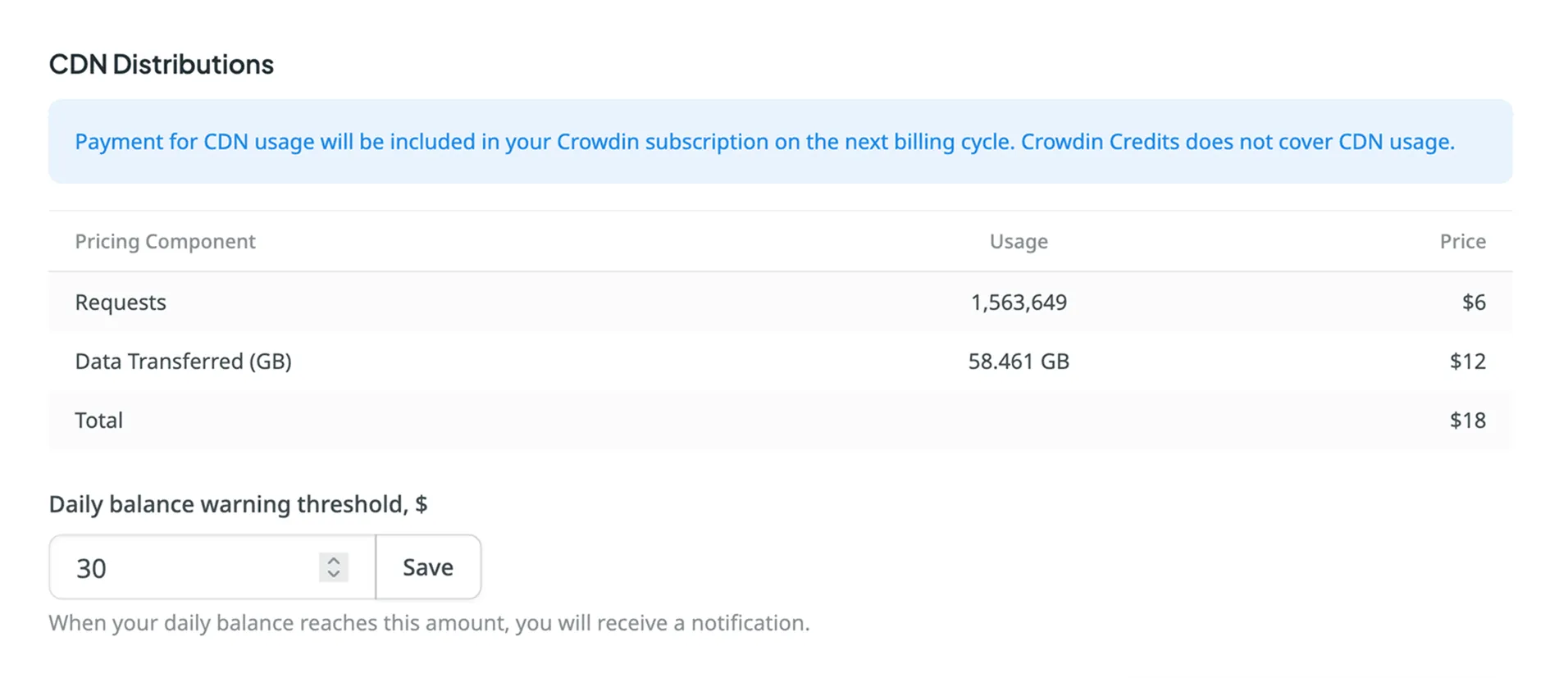
You can set a daily CDN usage limit, and when this threshold is exceeded, you’ll receive a notification. By default, the limit is set to $30 per day. This feature helps you stay informed of your usage and avoid unexpected overages. You can update the limit anytime. Additionally, if your free quota (1M requests and 10GB of data transfer) is exceeded, a one-time notification will be sent.
To set up usage notifications, follow these steps:
- Hesap Ayarları’nızı açın ve Faturalandırma sekmesine gidin.
- CDN Dağıtımları bölümünü bulun.
- Enter your desired threshold amount in the Daily balance warning threshold, $ field.
- Click Save to confirm your settings.
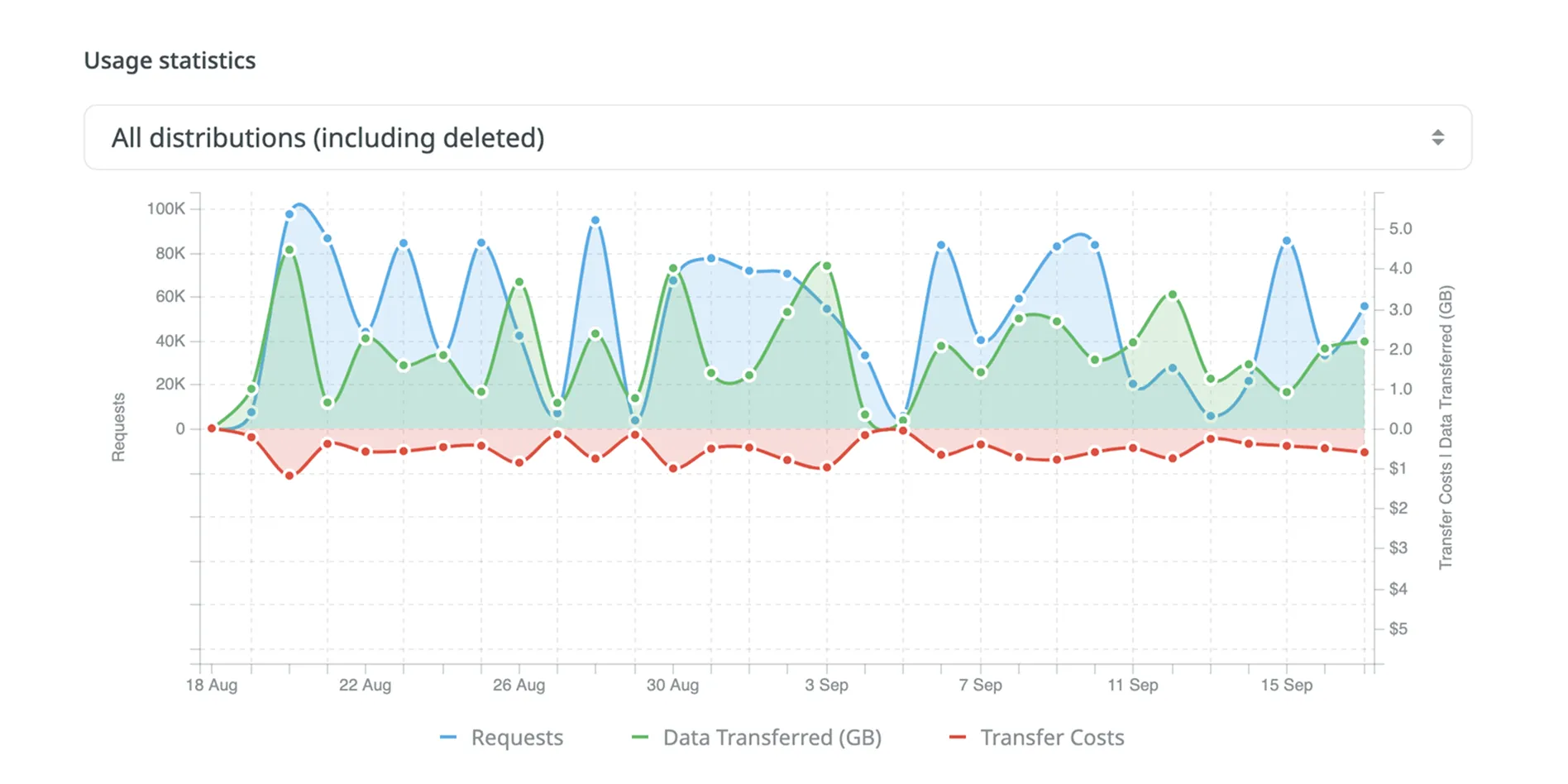
The Usage Statistics section provides a visual analysis of your CDN usage via an interactive graph, showing detailed statistics for the month. You can view data for all distributions or focus on specific ones.
The graph displays three lines simultaneously: request quantity, transfer costs, and data transferred. Hover over the data points to see daily totals for each category.
You can also focus on a specific category by hovering over its title under the graph. To hide a certain category from the graph, click on its title.
The Project Statistics section, located below the graph, provides a detailed breakdown of your CDN usage grouped by project. This table helps you track which projects are consuming the most resources during the selected period.
Each row in the table represents a single project and includes the following information:
- Project: The name of the project.
- Requests: The total number of requests made by the project.
- Data Transferred (GB): The total data transferred by the project.
- Price: The approximate cost for the project’s usage.